


Everything you need to know on how to open PayPal account in Nigeria and verify it
[FREE GUIDE] How to open PayPal account in Nigeria
PayPal is an online payment service that makes it easy to send and receive money online. With PayPal, users can transfer money, receive money, withdraw money, send invoice to clients and many more.
Paypal is Based in the United States of America and it is accepted in up to 200 countries worldwide! Before now, there was restriction on Nigerians using PayPal to send or receive money. Nigerians were not allowed to open a Paypal account. But in 2014, that restriction was lifted and Nigerians were allowed to operate a personal PayPal account, but the account can only send money.
In this free guide, I would show you step by step how to open and verify a personal PayPal account in Nigeria. With a personal PayPal account, you can make payment to millions of merchants around the world that accept payment via Paypal. If you love shopping online, then this account is highly recommended for you.
What you need to open a personal PayPal account in Nigeria:
- Your name is required. It has to be your legal name that is on your birth certificate and documents
- Your email address
- A strong password
- A Debit or credit card. Only Visa and MasterCard are accepted. Verve is not accepted.
- Your address will be required.
In this post, I would be showing you how to create a personal PayPal account. For a business Paypal account, you will find the link to open it at the end of this article.
Step 1
To sign up for a PayPal account legally in Nigeria and start paying for goods online with it, visit this page on your browser, www.paypal.com/ng and click on sign up.
Select Nigeria as your country.
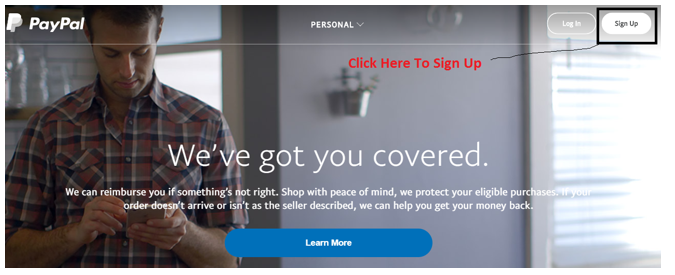
Click on sign up as indicated above and you would be taken to the next page.
On the next page, you are to fill a sign up form.
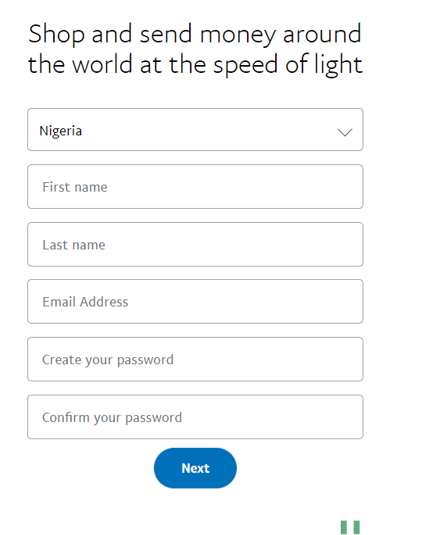
Make sure you fill the form correctly. Enter your name, email, the password that you’ll like to use to access your account. Make it very strong and write it down somewhere so you don’t forget it.
The password format can be something like Bams=2021
Step 2
Click on next and you would be taken to a page similar to the one below
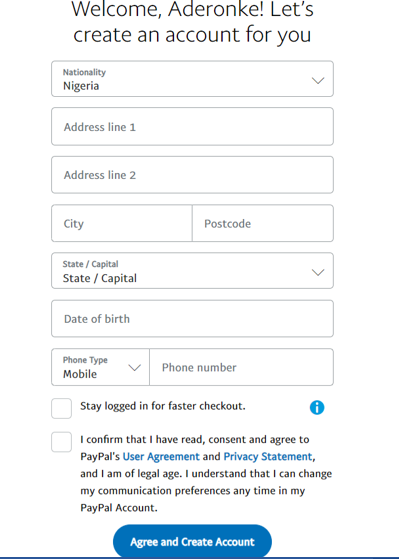
Enter your home address in address line 1. Leave the address line 2 blank except you want to enter another address in line 2. Enter your city and post code.
You can get your postcode from Google. You can also get your post code directly on https://www.nigeriapostcodes.com
Ensure you use your accurate home address, date of birth, phone number etc.
Mark the box that says you should consent and agree to PayPal’s User Agreement.
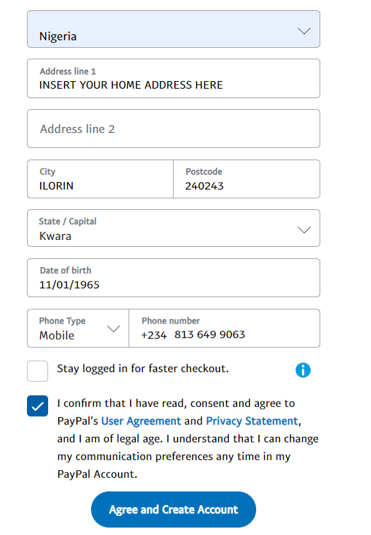
Click on Agree and Create Account, you would be taken a page similar to the one below

Step 3
Click on Add card to use later and you would be taken to the page below

You can use a Visacard or a Mastercard from Gtbank, Uba africard, or ATM cards from other banks with Mastercard and Visalogo on them to verify your PayPal account.
Due to CBN policy, most naira cards can no longer be used to verify a Nigerian PayPal account, If you are told that your card cannot be used, that you should link another card, it simply means that your bank does not allow you to use your naira card to verify your PayPal account. In this case, you have to use a dollar Master card or Visa card linked to your domiciliary account.
Simply go to your bank and ask them that you need a domiciliary account.
Once you open the domiciliary account and you are issued an ATM card, use it to verify it but ensure you have enough funds on any ATM card that you want to use to verify your PayPal account.
You need to confirm your email address by clicking on the confirmation link that would be sent into your email address. The email would look similar to the one below

When you receive this message click on Confirm Email Address
Step 4
After you have confirmed your email address, you need to login to your account again. Make sure you don’t forget your password.
THINGS TO KNOW BEFORE YOU LINK AN ATM CARD TO YOUR PAYPAL ACCOUNT
- The name on your card does not have to be exactly as the name you used in opening the PayPal account, but ensure your name on the PayPal account matches the name on your means of identification. You may run into any issue with PayPal in future and they may request that you verify your identity.
- You can use your sister’s/husband’s credit/debit card to verify your PayPal account if you don’t have a bank account yet, but make sure you can confirm any money deposited through it.
There should be at least $3 in this account or the equivalent amount in Naira if you are using a naira debit card.
PayPal would try to debit this card to make sure the card is working well and you would be asked to verify this deposit in order to confirm that you are authorized to use this card or to confirm it’s yours.
Important Details On The Card That Would Be Required To Verify Your PayPal Account Are As Follows
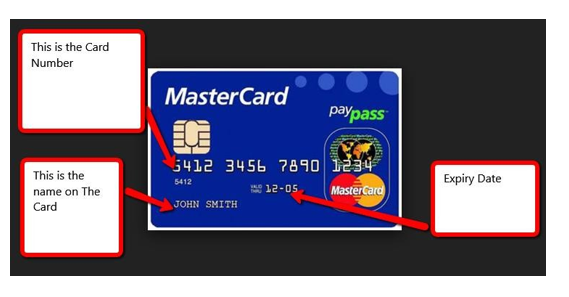
Card Number – This is the long digits written on the same line at the front of the card
Expiry Date – Written in the format 11/25 or 11-25 at the front of the card. What it means is that, the card would expire by November 2025.
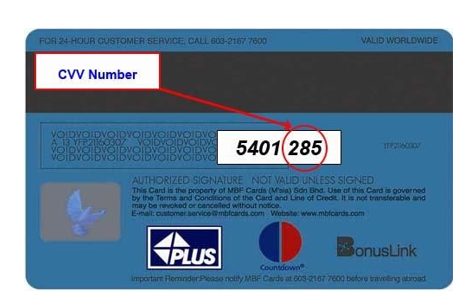
Cvv/CVV / CVV2 / CSC / CID/Security Code – This is a small three digits written together at the back of the card.
Step 5
It’s time to link an ATM card to your PayPal account.
Linking an ATM card to your PayPal account is the same thing as verifying it.

Once you enter your card details in the right format as illustrated above, click on Link Card, it would bring out the image below.

Click on Confirm credit card and you would be taken to the page similar to the one below

Most of the times, you will get the debit alert instantly on your phone and sometimes it may take a few days. When you get a debit alert from your bank for this PayPal transaction, the debit alert would look similar to the one below
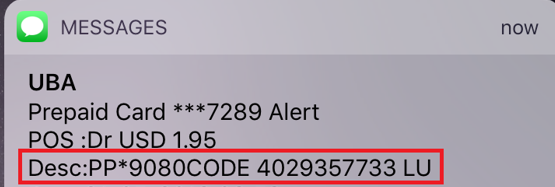
If you check your bank statement online, the PayPal code may appear like this

The 9080 or the 6049 is the code needed to verify your PayPal account. Depending on the exact code that was sent to you.
If you use a Naira card from Gtbank, the PayPal debit alert you will get may look similar to the one below

The 0912 in that debit alert is what is needed to verify your PayPal account.
If you use a Payoneer card, you need to login to your Payoneer account to get the code. See mine below
 The 1007 is the 4-digit code you need to enter
I hope that is clear? Great! Let’s move on…
Now that you have the PayPal code, it is time to input it and confirm the ATM card linked to your PayPal account. On your PayPal account, look for the notification that says you should confirm your card.
You should see this notice by your right hand side on your PayPal account.
See below

An email would also be sent to you to confirm your card. You can use the confirm card in your email to confirm your card.
Click on Verify your card and you would be taken to the page below

6049 is the four digits code that was sent to me to verify this particular card. Your own code would be different from mine. I am just using this as an illustration.
Once you enter the code correctly, click on Confirm
You will get this notice instantly

Once you do this, your PayPal account would become verified immediately.
When next you login, you may be asked to confirm your phone number.

You can confirm the number if you want and you can click on Not now
Once you have completed these steps, you are good to pay for goods from your favorite stores all over the world. You can also send payment to any PayPal account holder instantly globally. They only need to give you their PayPal email address. Also note that your PayPal balance would always be 0.00. That is because, any funds spent from your PayPal account would be deducted directly from the debit card you have used to verify it.
Do not forget, you cannot receive money with this PayPal account and you cannot fund it, you can only use it to send payments and make payments online.
To receive payments online with PayPal in Nigeria, follow this link to get the information https://aderonkebamidele.com/how-to-open-a-paypal-account-in-nigeria-and-receive-payments/
If you find this post helpful, feel free to share with others.



48 comments
I love to have accunt with PayPal some one introduce me to it so I really love the way paypal
Paypal
I want to open my account
I want to open account pls
It’s really educative thank you
I want to open paypal business account in Nigeria Mrs Adesomoju Florence
I love Paypal
I want to open an account plz
It good App
What if I don’t want to go to the bank for a domiciliary account…….is there any other way I can go about it, cause Nigerians bank stress is too much
I want to open an account
I want to open an account
How can I transfer money from my PayPal account to my local bank account?
I want to open a pay pal account
Very helpful indeed. But yet one more thing remains. Since you said I can’t use the PayPal to receive neither can I fund it, how do I then add money to my Paypal account.
Thanks.
How to open PayPal account
Thank you. This was really helpful. How can I open a business account that I can be able to receive money please??
when you send money can you also receive money?
I want to open a PayPal account but am not using Visa card any way out please?
I tried linking my card but it’s failed master card at that but there’s negative balance on the account i don’t know if that’s why as they don’t accept the card in where i have money